
Introduction
Standing at the metro gate, I watched my friend tap a blue card and pay half what I just did. That was the moment I stopped using a silver NOL and switched to the Student NOL Card. I lost nothing but the overpaying. Thousands of Dubai students make the same mistake every day, simply because nobody told them this card exists.
Key Takeaways
- Students aged 6–23 enrolled in UAE schools get 50% off all RTA public transport fares: metro, bus, and tram.
- The AED 70 card doubles as an ISIC international student ID, unlocking 150,000+ discounts in 130 countries.
- Apply entirely through the nol Pay app in under 15 minutes. Offline and website backups exist but are slower.
- The card is valid for 5 years if your child is under 18, then annual renewal at AED 50 from 18 to 23. Set a calendar reminder so you never lose the discount.
- Activate ISIC, set up auto top-up, and use the card for school canteens to get the full value beyond transport.
The confusion is real. Parents hear “UAE Pass” and “document upload” and assume a bureaucratic maze. They worry about eligibility, about getting the wrong card, about wasting an afternoon at an RTA counter. The truth is simpler: if your child is 6 to 23 and enrolled in a UAE school, you qualify. The whole application lives inside the nol Pay app, and it rarely takes more than fifteen minutes.
What most families miss is that this card is not just a transport pass. It carries a digital ISIC: a globally recognized student ID that unlocks museum entry, software licenses, travel fares, and retail discounts across 130 countries. Yet the ISIC sits dormant on most cards because nobody activates it. That is money left on the table, trip after trip.
This guide walks you through the full lifecycle. We start with what the card actually is, then move step by step through application, activation, daily use, renewal, and replacement. By the end, you will have a clear action plan to get the card and start saving immediately.
Now let’s understand exactly what this card is and why it’s worth the effort.
The Student NOL Card is a blue personalized smart card issued by RTA for students aged 6 to 23. It’s two things in one: a transport pass that automatically cuts your fare in half, and an official student ID recognized worldwide. No separate cards, no extra apps: just one piece of plastic that works across Dubai’s entire public transport network and far beyond.
The 50% discount applies on every RTA mode: metro, tram, bus, and water taxi. You tap in at the gate or terminal, tap out at your destination, and the reduced fare is calculated instantly. There’s no code to enter, no special ticket to buy.
For a student commuting daily between home and school, that single feature can save hundreds of dirhams a month without any extra effort.
The card is integrated with the globally recognized ISIC program, which unlocks over 150,000 student discounts in 130+ countries.
The 50% fare cut gets all the attention, but it’s the ISIC side that quietly saves you hundreds. We helped a family of three who had been using the card for a year purely for the school run. When we showed them the ISIC portal, they found discounts on flights to London and half-price entry to the Louvre Abu Dhabi. Savings that dwarfed the transport discount. That’s the part nobody warns you about.
That’s exactly why we’ll walk you through activating the ISIC benefits from day one.
Beyond transport, the card doubles as a payment method at school canteens and any NOL-accepting shop. That means one card for bus fare, lunch, and a snack at the supermarket: less to carry, less to lose. It’s a small convenience that adds up when you’re juggling books, a phone, and a water bottle every morning.
Now that you know what the card does, let’s check if you qualify.
Who Can Apply: Eligibility Criteria
Before you spend a single minute gathering paperwork, make sure the student ticks all three boxes.
The first is age. RTA sets a hard window: 6 to 23 years old. No exceptions for early birthdays, no grace for gap years. If the student turns 6 next month, the app will reject the application today. I’ve had parents ask me, “My child is 5, can we get the card early?” The answer is no. Here’s why.
The RTA’s age rule is a hard line: 6 to 23, no exceptions. I once helped a family whose daughter turned 6 in September, and they tried to apply in August. The app rejected it instantly. We had to wait until her birthday.
That’s the kind of detail that saves you a wasted afternoon. The same logic applies at the upper end: the day you turn 24, the Student NOL Card is no longer an option.
Expert Tip: Children 5 and under ride free and don’t need a NOL card; students 24+ must use a standard Silver or Gold NOL Card.
The second condition is full-time enrollment in a UAE school or university. Part-time students, online-only learners, and those on a study break are not eligible. The system checks your enrollment status against the certificate you upload, so don’t try to bend this rule.
Third, you need a valid Emirates ID. An expired ID will block the application at the first step. If the student’s ID is up for renewal, sort that out before you open the nol Pay app.
One detail that catches families off guard: the card is issued to the student, not the parent. The child is the primary cardholder, and the application must be in their name. This matters because the photo, the Emirates ID, and the enrollment letter all need to match the student’s identity.
International students on a UAE student visa generally qualify under the same criteria. As long as you’re 6–23, enrolled full-time, and hold a valid Emirates ID, you’re in.
Qualified? Good. Here’s exactly what you’ll need to have ready before you open the app.
Required Documents Checklist
Rejections almost always come down to one thing: sloppy documents. Let’s get this right the first time.
Start with the Emirates ID. You need a clear scan of both the front and back. The card must be valid: expired Emirates IDs are an automatic rejection. A blurry phone photo won’t cut it; the system needs to read every digit and the chip area without glare.
Product Recommendation: Use a scanning app like CamScanner to create clean, flat digital copies of your documents: blurry phone photos are the #1 cause of upload rejections.
Next, the official enrollment letter. This must come from your UAE school or university, printed on letterhead, and dated within the last 3 months (as of publication). It needs to confirm full-time enrollment. 3 months: that’s the shelf life of an enrollment letter, and I’ve seen too many families submit one that’s 4 months old and get bounced.
The letter must include the student’s full name and the current academic year. Missing either detail is a top cause of rejection, so double-check before you scan.
The passport-size photo has strict rules: a plain white background, taken within the last 6 months (as of publication), with no shadows, filters, or heavy editing. A quick selfie against a white wall often fails because of uneven lighting. Get a proper studio shot or use a passport photo app that removes the background cleanly.
Finally, your UAE Pass account must be fully verified. The nol Pay app uses UAE Pass for digital identity verification, so you can’t proceed without it. If you haven’t already, download UAE Pass, complete the verification with your Emirates ID, and make sure it’s active before you start the application.
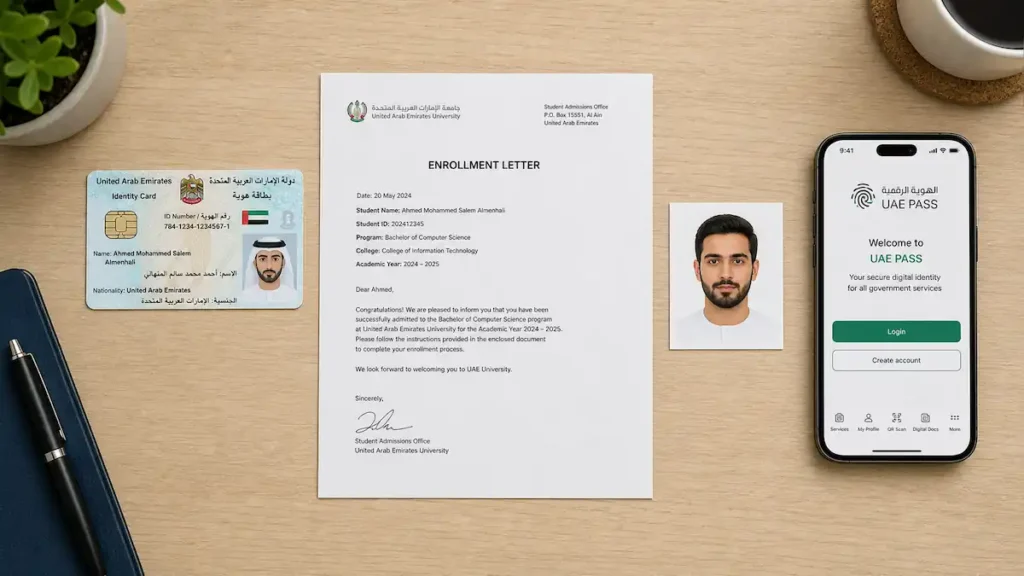
Documents ready? Now let’s walk through the application itself, step by step.
Step-by-Step Application Process (Online via nol Pay App)
This is the main event. The nol Pay app is the fastest, most reliable way to apply, and it catches mistakes before you submit.
Step 1: Download and Set Up the nol Pay App
Download the nol Pay app from the Apple App Store or Google Play Store. It’s the official RTA app for all nol services.
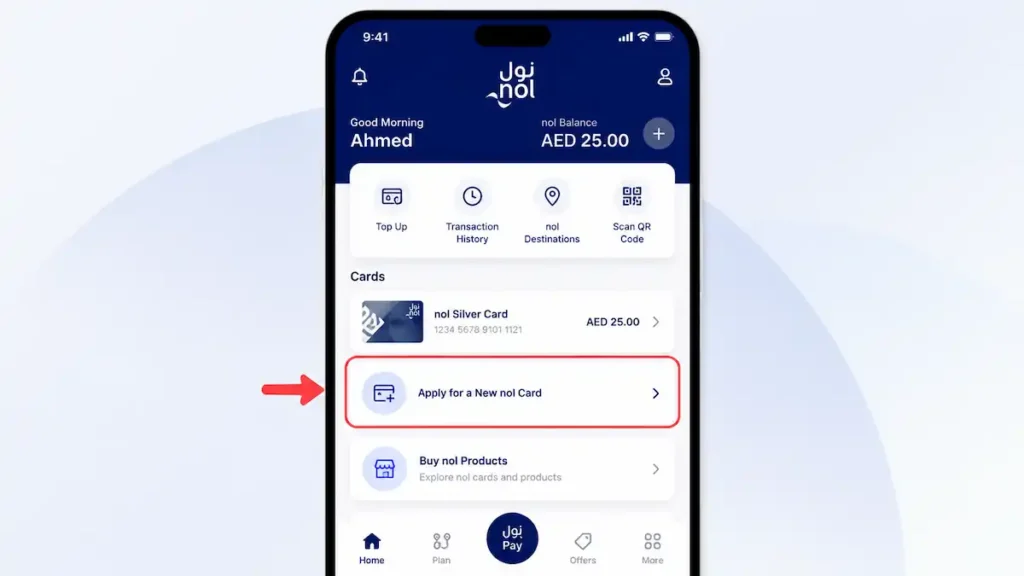
Product Recommendation: The nol Pay app is the official RTA app for all nol services; avoid third-party apps that claim faster processing.
Open the app and sign in with UAE Pass. This step is mandatory. Your Emirates ID must be active and your phone number registered with your UAE Pass account. If you haven’t set up UAE Pass yet, do that first. It’s the digital identity key for all government services in the UAE.
The app redirects you to UAE Pass for authentication, then brings you back. If you run into login issues, double-check that the mobile number in UAE Pass matches the one linked to your Emirates ID. A mismatch is the most common snag.
The entire application is digital. You never need to visit an RTA center or mail physical documents. Just make sure your app is updated to the latest version to avoid compatibility hiccups.
Step 2: Select the Student NOL Card Type
Once logged in, tap “Apply for a New nol Card” on the home screen. You’ll see a list of card types: Silver, Gold, and the Student NOL Card. This is where many people slip up.
Expert Tip: Don’t accidentally select the Silver or Gold NOL Card, only the Student NOL Card gives the 50% transport discount and ISIC benefits.
Select the Student NOL Card (sometimes labeled “nol Student Package”). The app will then ask you to confirm eligibility. You’ll also see an option to add the ISIC digital ID for an extra AED 25. If you plan to use international student discounts, from museums to software to travel, it’s a no-brainer. The ISIC is integrated directly into the card, so you won’t need a separate physical ID.
Step 3: Enter Student Details and Upload Documents
Now fill in personal details exactly as they appear on the Emirates ID. The app pulls some data from UAE Pass, but double-check everything. A single typo can delay processing.
Then upload the three required documents: Emirates ID (front and back), a passport-size photo with a pure white background, and the official enrollment certificate from your school or university.
I thought any passport photo would do, but the app rejected mine instantly, the background was a shade too cream. That’s when the white background requirement stopped being a checklist item and became a real thing. The app’s validation caught it before I wasted days waiting for a rejection email.
The app’s real-time validation checks each document against RTA’s specifications before you can proceed. If something’s off, it flags it immediately with a clear reason: an expired enrollment letter, a non-white photo background, or a blurry Emirates ID scan. This is a huge time-saver compared to the old paper-based process. Make sure the enrollment certificate is clear and legible; the app will reject documents that are cropped or have shadows.
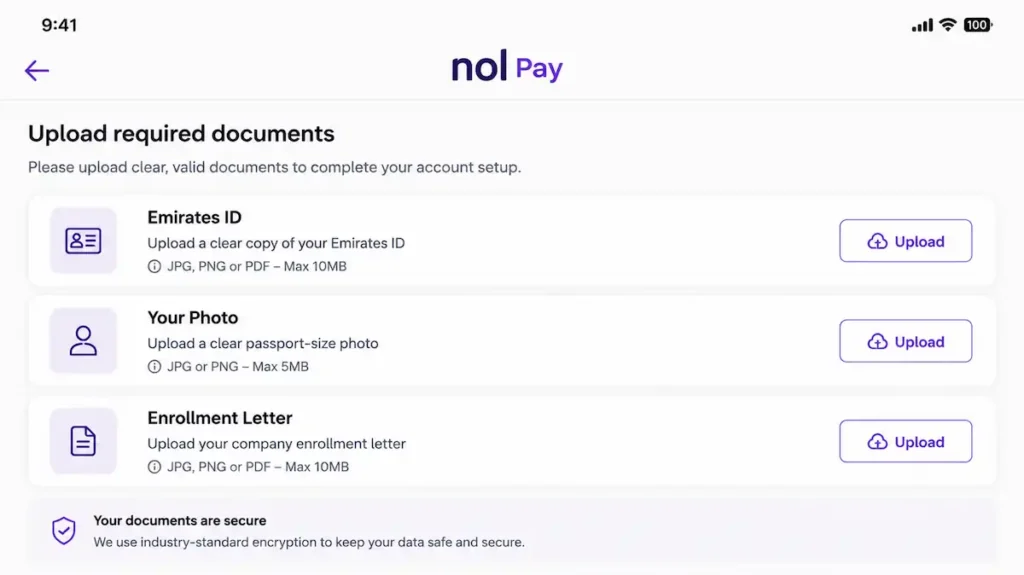
Step 4: Review and Pay the Issuance Fee
After uploading, review all entered details carefully. The app shows a summary screen. Once you’re sure everything is correct, proceed to payment.
The total fee is AED 70, a one-time payment that includes AED 20 preloaded credit, so the card is ready to use the moment it arrives. Pay with a debit or credit card. The transaction is secure, and you’ll receive a confirmation email with your application reference number.
Expert Tip: The AED 70 is a one-time fee; the card comes preloaded with AED 20, so you can use it immediately upon receipt.
Save the reference number or take a screenshot. You’ll need it if you ever have to follow up with RTA support.
Step 5: Receive and Activate Your Card
Delivery takes about 4 working days, though during peak periods it can stretch to 5–7. The card arrives by courier to the address you provided.
Alternatively, you can choose to collect it from a designated metro station; the app will show available pickup points. If you opt for station pickup, you’ll get an SMS when the card is ready, usually within the same 4–7 day window.
The card is already active for tapping in and out. No separate activation call is needed.
Once you have the physical card, open the nol Pay app and go to “Add Existing Card.” Scan the serial number on the back of the card. This links the card to your account, unlocking balance checks, trip history, and low-balance alerts.
Expert Tip: Link the card to the nol Pay app immediately to check your balance, view trip history, and get low-balance alerts, crucial for busy students.
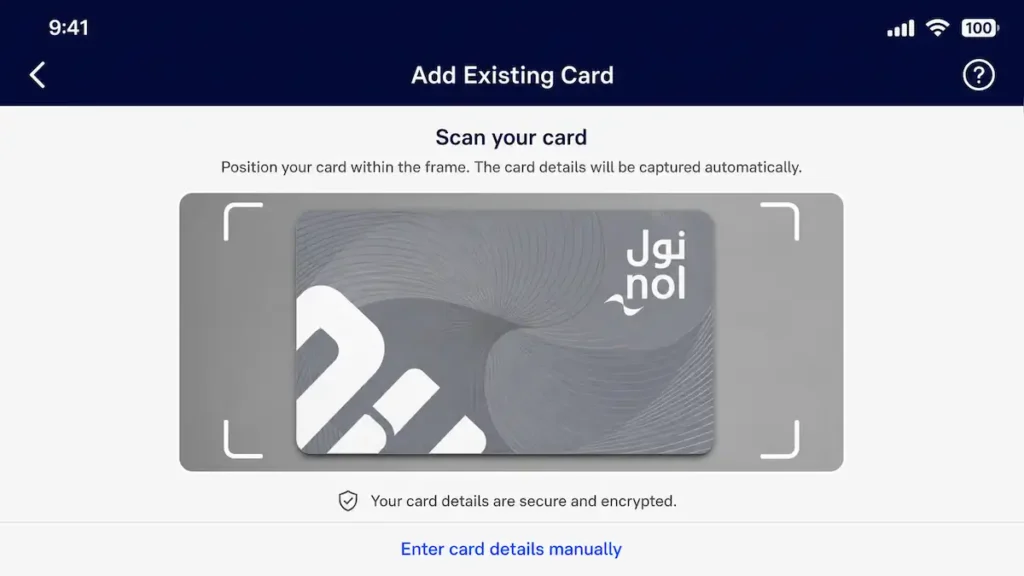
If you paid the optional AED 25 ISIC fee, the digital ISIC will activate automatically and appear in the app’s wallet section, ready to show at museums and retailers.
Prefer a browser or need to apply in person? Here are your backup options.
Alternative Application Methods (RTA Website & Offline at Stations)
The app is best, but life doesn’t always cooperate. Here’s how to apply through a browser or in person.
Apply via the RTA Website
Head to rta.ae and navigate to Public Transport > nol > Apply for a Personal nol Card. The web form asks for the same details and documents as the app: student ID, Emirates ID, a passport photo, and the AED 70 fee. You fill everything out, upload scans, and submit.
The trade-off: the website does not offer real-time document validation. The app flags a blurry photo or missing signature instantly; the website only surfaces errors after a manual review, which can add days. Still, it’s a workable path if you don’t have a smartphone or prefer a desktop. You can start from home, save your progress, and avoid a trip to a station.
Expert Tip: The website is a solid backup, but the nol Pay app is faster and more user-friendly.
Apply Offline at a Metro Station Customer Service Center
Major stations like Burjuman, Union, and Mall of the Emirates have customer service counters that process Student NOL Card applications. Bring the originals of every required document plus a set of photocopies. Staff will check them on the spot, which eliminates the back-and-forth of a rejected online submission. You fill out a short paper form, pay AED 70, and in many cases walk out with the card.
Last summer, my cousin needed a Student NOL Card urgently for a school trip. We went to Burjuman station with a folder of documents. The agent verified everything in under ten minutes and handed us the blue card right there.
That’s the differentiator nobody mentions: offline can be the fastest route to a physical card in your hand, no waiting for delivery, no app glitches. It only works if you’re prepared, but when you are, it’s a quiet superpower.
Processing times vary, though. Some stations may need to forward the application and ask you to return later. To avoid a wasted trip, call RTA at 800 9090 before you go and confirm the current process at your chosen station.
Expert Tip: Offline applications can take longer; call RTA at 800 9090 beforehand to confirm the station’s process and avoid multiple visits.
Card ordered? Let’s talk about what you’ll pay now and later.
Fees, Validity, and Renewal
You’ve applied. Now let’s talk money: what you pay today, how long the card lasts, and what renewal looks like.
Fee Breakdown
The AED 70 issuance fee breaks down into a AED 50 application charge and AED 20 of preloaded credit. You’re not paying for an empty card. We get the same call at least twice a week: ‘Why did I pay AED 70 for an empty card?’ That AED 20 is ready to use the moment you tap in; it’s not a separate voucher or code.
You can take your first discounted ride immediately after receiving the card. After that, every top-up you add goes entirely toward fares, and there are no hidden transaction fees or monthly charges. The AED 70 fee is typically non-refundable, so a rejected application means you lose the money and must pay again.
Expert Tip: Double-check your documents before submitting. The AED 70 fee is typically non-refundable, and a rejection means paying again.
For students 18 and older, an annual renewal fee of AED 50 applies. This is separate from the initial issuance cost and covers the administrative verification of continued full-time enrollment. Under-18s never pay this renewal fee.
Card Validity by Age
The Student NOL Card’s lifespan depends entirely on the student’s age at application. The table below shows exactly what to expect.
| Age at Application | Card Validity | Renewal Required? |
|---|---|---|
| 6–12 years | 5 years | No |
| 13–17 years | 5 years | No |
| 18–23 years | 1 year | Yes, annually |
Under-18s get a single 5-year validity with no renewal fees. That’s a significant advantage. This 5-year validity is a one-time grant; once the student turns 18, the card shifts to the annual renewal cycle.
If your child is 17, apply right after their birthday to lock in the 5-year validity and delay the first AED 50 renewal as long as possible.
The maximum lifespan is until the holder’s 24th birthday. The card stops working the day the student turns 24, even if it was issued just a year earlier.
How to Renew
Under-18 cards are valid for 5 years. No action needed. Once the student turns 18, the process changes: you must renew annually through the nol Pay app. Each year, upload a fresh enrollment certificate that proves full-time study; an expired or part-time certificate will be rejected, and you’ll have to resubmit.
Pay the AED 50 renewal fee. The renewal is not automatic. You must initiate it each year, and the discount won’t reactivate until the new certificate is approved. Remember, the card’s absolute cutoff is the 24th birthday. No renewal beyond that.
Expert Tip: Set a calendar reminder one month before the student’s 18th birthday. Missing the renewal deadline deactivates the discount until you renew.
The card saves you money on every ride. But transport is just the start: here’s everything else it unlocks.
Benefits and Discounts (Transport, ISIC, School Integration)
You’ve got the card. Now let’s squeeze every dirham of value out of it, starting with the obvious 50% fare cut.
50% Transport Discount
The discount is automatic. Tap your Student NOL Card on any Dubai Metro gate, tram platform, bus reader, or Palm Monorail turnstile and the system instantly applies half the standard fare. It works across all zones, so a cross-city commute costs exactly half what your friends pay with a Silver card.
The same 50% applies on RTA intercity buses, too, but for unlimited travel, a NOL monthly pass might be a better deal. That’s handy for students who travel between Dubai and the other emirates for university or family visits.
There’s no separate application, no monthly cap to track, and no peak-hour blackout. The card simply knows you’re a student and charges you less every single trip. I’ve watched families budget for full-fare transport for a term, only to realize later they’d been overpaying because the student was tapping a standard card.
The switch to the Student NOL Card cut their monthly transport spend by nearly half.
And that was before they touched the ISIC side. The only catch: the discount is tied to the cardholder’s identity. Expert Tip: The discount is only for the cardholder; never lend the card, as inspectors verify the photo and Emirates ID, and misuse can result in fines.
ISIC International Student Discounts
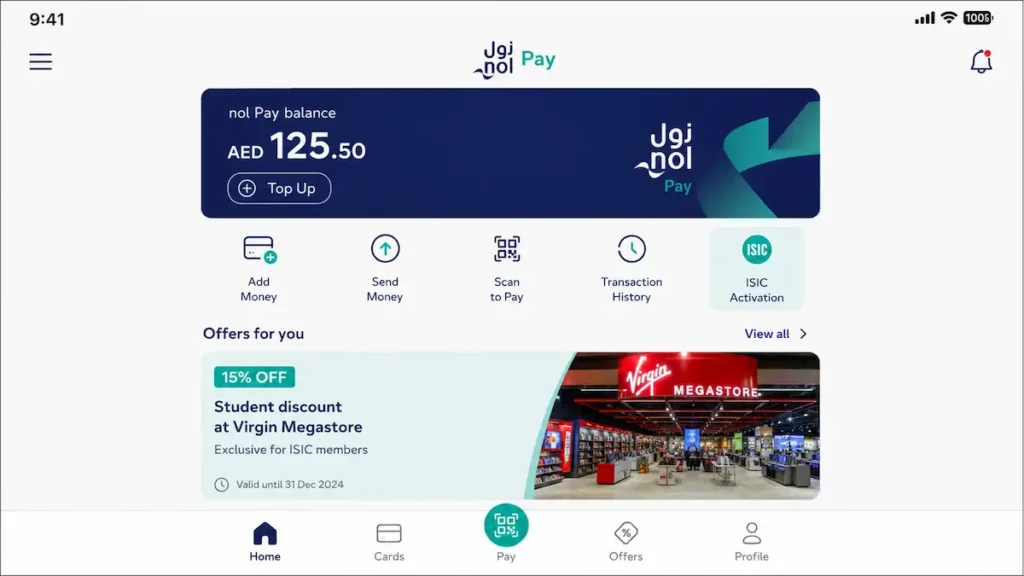
The Student NOL Card carries a digital ISIC ID, a UNESCO-endorsed student credential that unlocks over 150,000 discounts in 130+ countries. Most students never activate it, and that’s a mistake. Open the nol Pay app, find the ISIC section, and tap to activate. The digital ID then lives inside the app, ready to show at any participating merchant.
A student I helped last year had been using the card for months without activating the ISIC ID. When we finally tapped the button in the nol Pay app, she found a 20% discount on Dubai Aquarium tickets for a family outing and 10% off a new laptop at a major electronics retailer. That one activation saved her family over AED 300 in a single weekend. That’s the part nobody warns you about. The discounts aren’t just for travel abroad; they’re live right here in Dubai, at attractions, clothing stores, bookshops, and tech outlets. Product Recommendation: Download the ISIC app or visit isic.org to browse discounts, and link your digital ISIC ID to the nol Pay app for quick verification.
School Canteen and Retail Payments
The card doubles as a cashless wallet inside school gates. Where nol readers are installed in canteens, students tap to pay for lunch, snacks, and drinks: no cash, no change, no lost lunch money.
Expert Tip: Load a separate ‘purse’ for canteen spending to keep transport and food budgets distinct; manage this in the nol Pay app under ‘Manage Balance’.
Beyond school, a growing number of uniform shops and bookstores accept nol payments, so the same card that gets your child to school can also cover a new set of stationery or a PE kit. It’s one card for transport, identity, and daily spending, no juggling multiple cards or topping up separate accounts.
Still wondering if the Student card is really the right pick? This side-by-side comparison settles it.
Student NOL Card vs. Other NOL Cards Comparison Table
Not every NOL card is created equal. Here’s exactly how the Student card stacks up against the Silver NOL Card, Gold NOL Card, and Blue NOL Card.
Is the Silver card really the cheapest option? I thought so too, until I did the math.
When I first moved to Dubai, I grabbed a Silver NOL card for AED 25, assuming it was the budget-friendly choice. A month of daily commuting to university cost me around AED 300. Then a friend pointed out the Student NOL Card. I paid AED 70 for the card, but my monthly transport bill dropped to AED 150, and the ISIC discounts on software and a flight home saved me another AED 400 that year. The upfront price tag is misleading; the real cost is in the daily taps.
| Feature | Student NOL Card | Silver NOL Card | Gold NOL Card | Blue NOL Card |
|---|---|---|---|---|
| Target User | Students aged 6–23 | General public | General public seeking premium cabin | Eligible seniors and people of determination |
| Transport Discount | 50% off standard fares | None (standard fare) | None (Gold Class fare, higher) | Free travel |
| ISIC International Discounts | Yes, built-in | No | No | No |
| Card Issuance Fee | AED 70 | AED 25 | AED 25 | Free |
| Validity | 5 years (under 18) / 1 year (18–23) | 5 years | 5 years | 5 years |
| Top-up Options | nol Pay app, RTA website, station machines, retail outlets | nol Pay app, RTA website, station machines, retail outlets | nol Pay app, RTA website, station machines, retail outlets | nol Pay app, RTA website, station machines, retail outlets |
| School Canteen Use | Yes | No | No | No |
| Best For | Students who want maximum savings and global discounts | Occasional riders or budget-conscious commuters | Riders who prefer Gold Class cabins | Eligible seniors and people of determination |
Convinced the Student card is the one? Here’s how to use it day to day without a hitch.
How to Use, Top Up, and Check Balance
The card’s in your hand. Here’s how to use it every day without getting stuck at a gate or running out of credit.
Tapping In and Out
Every trip on Dubai’s metro, tram, or bus starts and ends the same way: hold your Student NOL Card against the reader. At metro gates and tram doors, tap the card on the circular pad. On buses, touch it to the reader near the driver or at the rear door. Wait for the green light and a single beep before you move through.
A red light or a double beep means the card wasn’t read. Try again, and if it persists, check your balance.
The system calculates your fare based on the zones you travel through, so tapping out is just as important as tapping in. If you forget to tap out at the end of your ride, the system can’t tell where you got off and will charge you the maximum fare for that route. That can easily be three or four times what you should have paid. Always tap out, even if the gate is already open or the bus is crowded.
Expert Tip: Keep the card in a dedicated slot or on a lanyard. Tapping through a phone case with other cards can cause interference.
How to Top Up
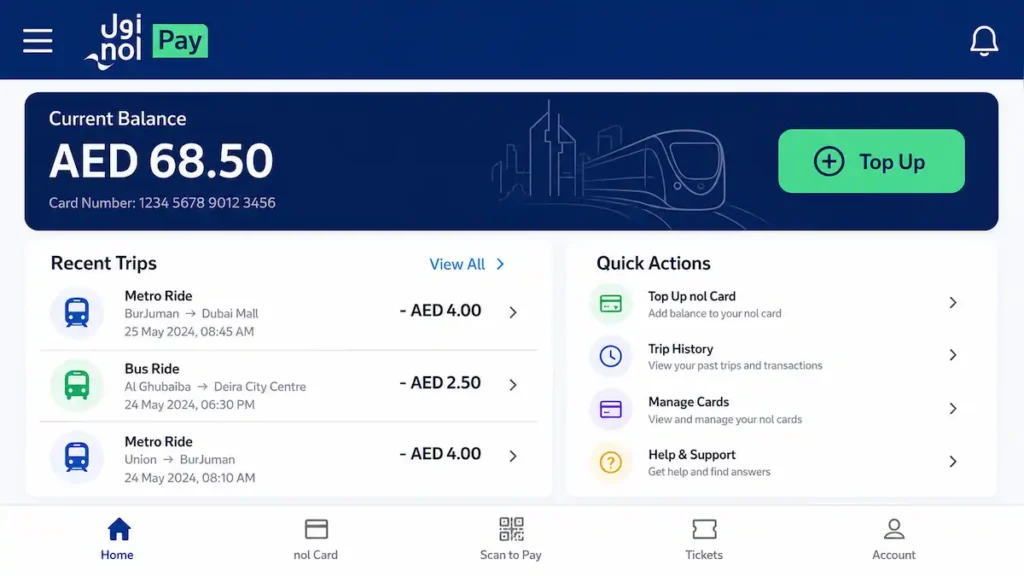
You have several ways to add credit, and the fastest is the nol Pay app. Open the app, select your card, and top up instantly with a debit or credit card. The RTA website offers the same function if you prefer a desktop. At any metro station, ticket vending machines accept cash and cards, and you’ll find top-up terminals at Zoom, Allday, and other authorized retail outlets across the city.
The real convenience, though, is auto top-up. Once you set it up, the system watches your balance and adds credit automatically when it drops below a threshold you choose.
Product Recommendation: Set up auto top-up in the nol Pay app with a minimum balance threshold (e.g., AED 15) to automatically recharge and avoid getting stuck at a gate.
Three times. That’s how many times I checked my balance in the first week using the nol Pay app dashboard, and I haven’t used a ticket machine since. The virtual card management turned out to be the feature that actually mattered, not the physical card’s design.
Checking Your Balance
You can see your remaining credit in four ways. The nol Pay app dashboard shows it front and center, along with your recent trips. When you tap in at a metro gate, the display briefly shows your balance before the gate opens. Any ticket vending machine will read your card and display the balance on screen.
The RTA S’hail app, which many students already use for journey planning, also shows your NOL card balance after you link it.
Expert Tip: Enable low-balance notifications in the nol Pay app to receive alerts before your balance runs out.
Got questions? We’ve anticipated the most common ones.
Interactive Application Readiness Checklist
Sometimes you just need a simple list to tick off. Here’s yours.
We’re at the airport check-in counter, and the agent asks for a student ID. My friend pulls out her Student NOL Card, but the ISIC logo isn’t there. She never activated the digital ISIC after getting the card. That missing logo cost her a student discount on her flight. It’s the tell experts spot: a blue NOL card without the ISIC badge means you’re leaving money on the table. This checklist ensures you never miss that step.
- Confirm eligibility: age 6–23, valid Emirates ID, UAE Pass installed
- Download the nol Pay app and log in with UAE Pass
- Upload documents and pay the fee
- Activate ISIC: download the digital card and link it to your Student NOL Card
- Set up auto top-up: link a bank card for automatic balance reloads
Prefer to watch someone do it? We’ve got a video for that.
Video Walkthrough of the nol Pay App Application
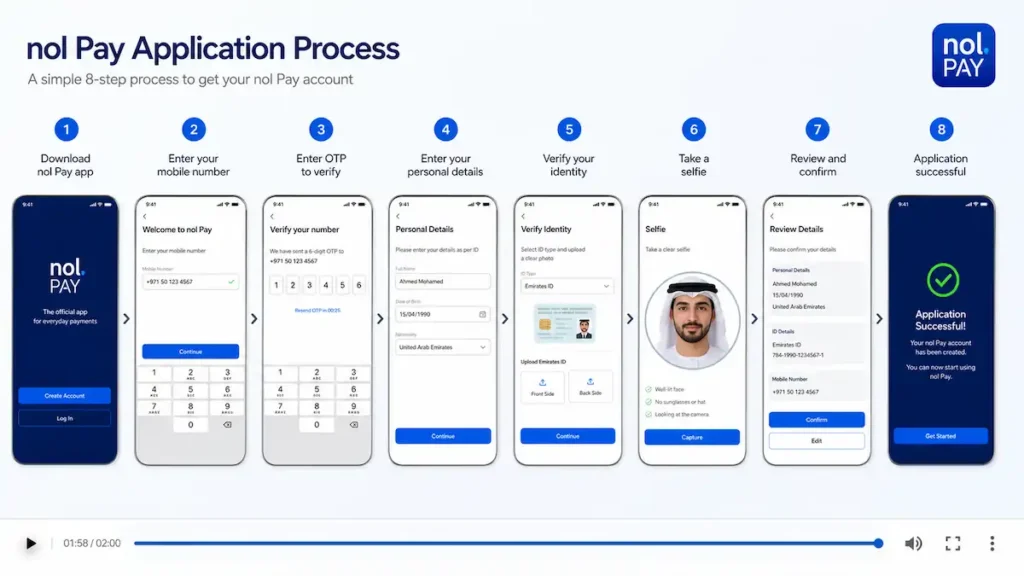
Reading’s not for everyone. Watch the whole process in two minutes flat.
Standing over a student’s shoulder as they stared at the app’s first screen, I saw the hesitation melt the moment the video started playing. This silent screen recording mirrors the written step-by-step guide exactly, so you can follow along on your own device. Step numbers and bilingual captions (English and Arabic) make it accessible without sound, and the entire application, from login to submission, runs in under two minutes. Pause and replay any segment to match the exact taps and fields on your screen. It’s built for visual learners and anyone who finds written instructions overwhelming.
One last thing before you go: a few final tips to keep everything running smoothly.
Final Tips and Reminders
You’ve made it. Here are a few parting tips to keep your student’s travel cheap and stress-free.
Keep digital copies of your Emirates ID, student photo, and application confirmation. A dedicated phone folder means no last-minute scrambles at renewal.
Bookmark rta.ae for policy updates before each renewal. Download the S’hail app for real-time trip planning and NOL balance checks. A quick glance at either can prevent a rejected application or a stranded student.
RTA’s helpline is the most underused tool in a parent’s arsenal. Last spring, my daughter’s card stopped tapping in. The balance was fine, the card wasn’t expired. It just refused. I called 800 9090, and within three minutes, the agent reset the card’s authentication remotely. No trip to a ticket office, no replacement fee.
Expert Tip: RTA’s customer service at 800 9090 is responsive and can assist in English or Arabic. Don’t hesitate to call if you hit a snag.
Share this guide with another family. A quick forward could save them hundreds of dirhams a year.