
Introduction
The gate beeps red. A line forms behind you. Your NOL card: declined. I switched from checking my balance at the station machine to the Nol Pay app after that exact moment. The machine showed a balance that hadn’t synced yet, while the app gives you the real-time number. That panic is avoidable, and this guide is built to make sure you never feel it again.
NOL card balance checker
Instant redirect to official RTA website
or check another way
Key Takeaways
- Your NOL card must have a minimum of AED 7.5 to enter any metro or bus. Check before you leave home.
- The Nol Pay app gives you real-time balance, auto top-up, and family card management in one place.
- No smartphone? Send a balance-check SMS (the shortcode is on the RTA website) or tap your card at any station machine; both work instantly without internet.
- After an online recharge, always tap your card at a gate or kiosk to sync the new balance.
- The 2026 digital upgrade will introduce QR codes and digital wallets, reducing reliance on physical cards. Download the Nol Pay app now to stay ahead.
You have five reliable ways to check your balance: the Nol Pay app, a balance-check SMS, any station machine, the Roads and Transport Authority (RTA) website, or a ticket office.
The AED 7.5 minimum balance rule is the single number that matters before every trip. I’ve tested every method as a daily commuter, and this guide gives you only what actually works: no fluff, no guesswork.
The 2026 digital upgrade will eventually make physical cards optional, but the Nol Pay app is your bridge right now.
Expert Tip: Check your balance on the Nol Pay app before leaving home. It shows real-time balance and transaction history, so you’re never caught off guard at the gate.
Now let’s cover the basics: what a NOL card really is and why that AED 7.5 minimum matters more than you think.
What is a NOL Card? Types and Minimum Balance Requirements
Before diving into the methods, let’s get clear on what you’re holding and the one rule that trips up even seasoned commuters. The NOL card is Dubai’s all-access pass, but not all cards are equal, and a tiny balance shortfall can stop you cold.
The NOL Card at a Glance
The NOL card is a contactless smart card that unifies payment across Dubai’s entire public transport network: metro, buses, trams, water buses, and even paid parking. It’s an RTA product, and you tap it on the reader at every entry and exit. No cash, no separate tickets.
NOL Card Types: Which One Do You Have?
Four card types exist, each with a different cost, credit, and use case.
- Silver NOL Card: Costs AED 25, with AED 19 of usable credit. The everyday workhorse for standard-class travel.
- Gold NOL Card: Also AED 25 with AED 19 credit, but it unlocks Gold Class cabins on the metro and tram. Worth it if you value a quieter, less crowded seat.
- Blue NOL Card: AED 70, with AED 20 credit. It’s personalized, so you can register it online, set up auto top-up, and link family cards. If you lose it, the balance is protected.
- Red Ticket: A disposable paper card for AED 2. It holds up to 10 single trips or a day pass. Ideal for tourists or one-off journeys, but it’s the least forgiving when your balance dips.
Product Recommendation: For daily commuters, the Blue NOL card’s auto top-up and family-linking features eliminate the risk of a low-balance rejection.
The AED 7.5 Minimum Balance Rule
Here’s the rule that catches people off guard: you must have at least AED 7.5 on your card to tap into any metro or bus, even if the trip costs less. For a round trip, you need AED 15. The system checks your balance before the gate opens, not after.
The AED 7.5 minimum balance rule is the one design choice that turns a convenient tap-and-go system into a public embarrassment. We’ve seen it happen at Dubai Mall Metro station: a tourist, fresh off the fountain show, taps their Red Ticket only to get a red light.
They had AED 5 loaded, just AED 2.5 short. The ticket was valid, the day pass active, but the system doesn’t care. They had to trudge back to the top-up machine while the queue piled up behind them.
That’s the gap between the RTA’s promise of seamless travel and the reality of a hard-coded threshold. Tourists and occasional users are most often caught out, especially when a Red Ticket day pass still demands that minimum.
Now that you know your card type and the minimum balance rule, let’s start with the most accessible method: the RTA website.
Method 1: Check Balance via RTA Website (Step-by-Step with Screenshots)
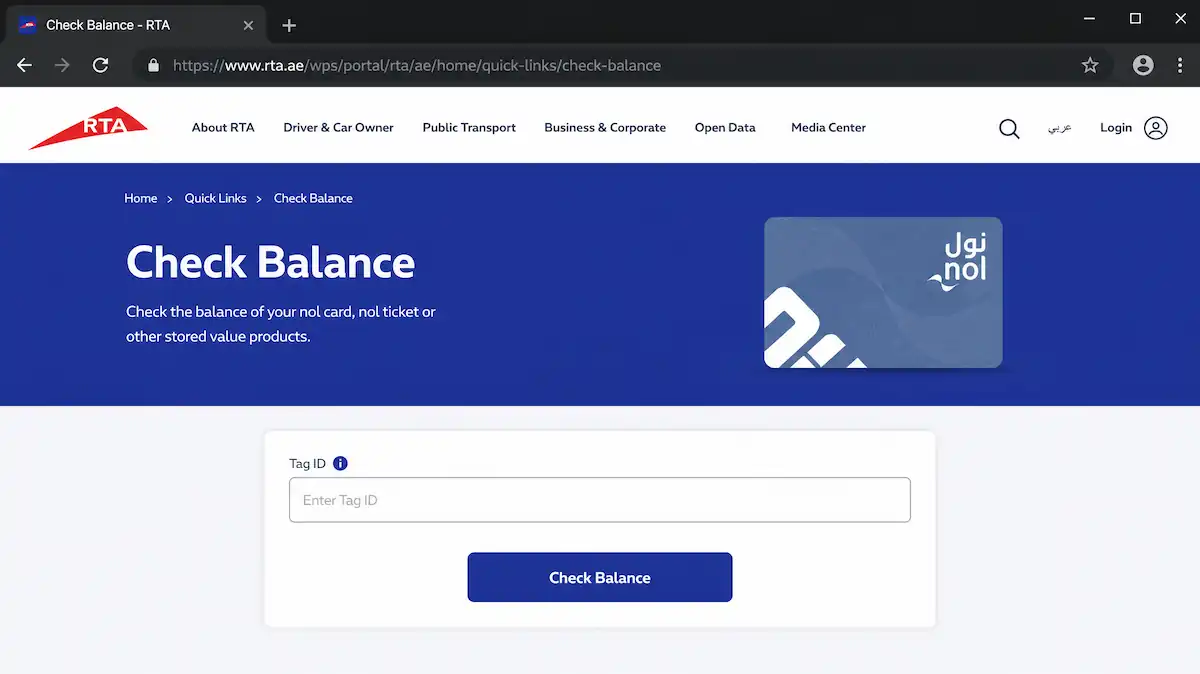
The RTA website is the official online method: no app download needed, just your Tag ID and a browser.
Step 1: Locate Your NOL Card’s Tag ID
Flip your NOL card over. The 10-digit Tag ID is printed on the back, below the magnetic stripe. You’ll need it for every online check.
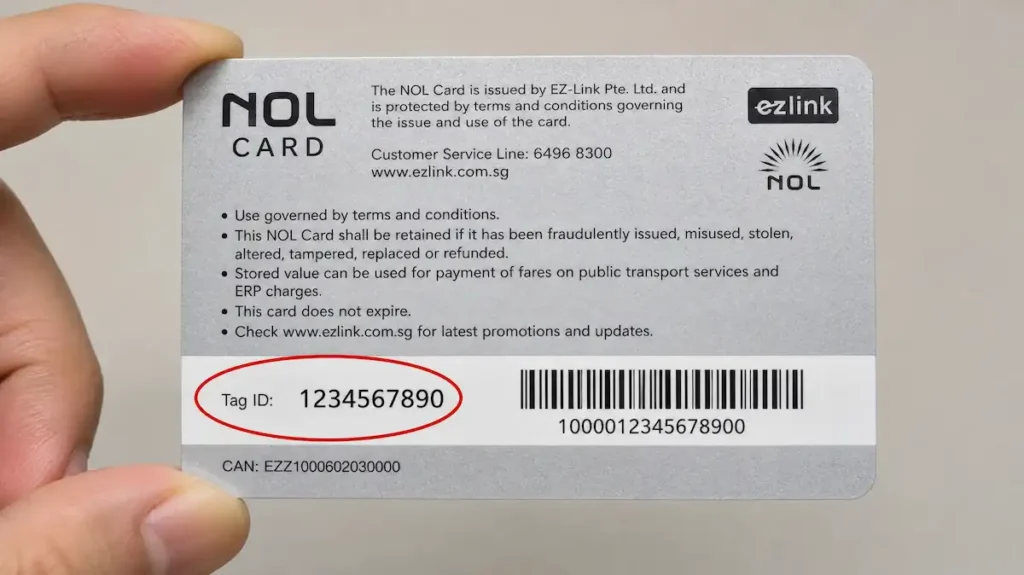
Ever stared at the back of your NOL card wondering which number matters? The 10-digit Tag ID is the key. I keep a photo of it on my phone. It’s saved me countless times.
Expert Tip: Keep a photo of your NOL card’s back on your phone for quick Tag ID reference when using the website or SMS.
If the number is worn, use the Nol Pay app’s NFC scan to retrieve it.
Step 2: Visit the Official RTA Balance Check Portal
Go to rta.ae and click “Check Nol Balance.” Never search for it; fake sites mimic the portal.
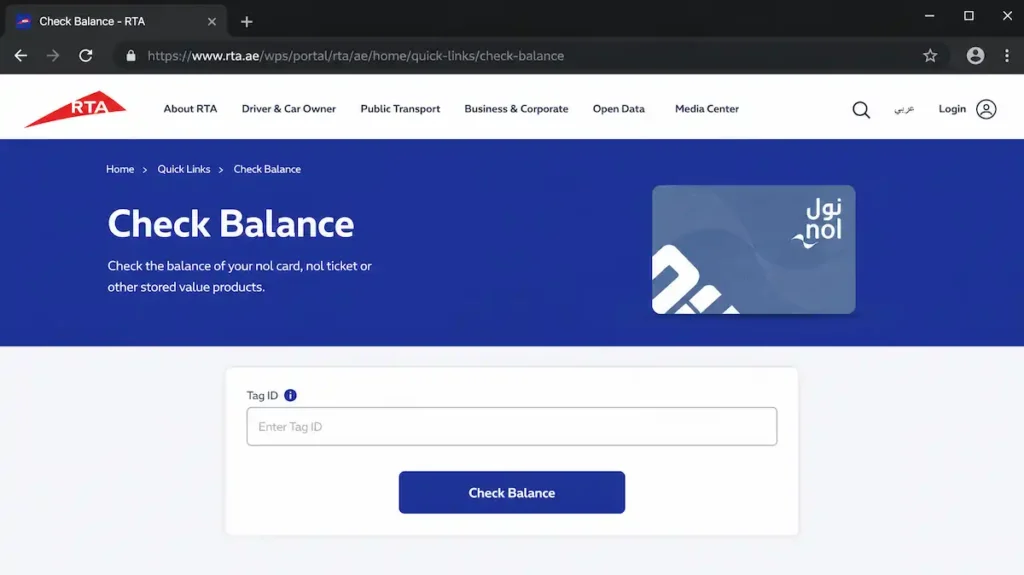
Step 3: Enter Your Tag ID and View Balance
Type the 10-digit Tag ID and click “Check Balance.” The screen shows your balance, card type, and last transaction: useful for verifying a top-up.
What to Do If the Website Shows an Error
- Invalid Tag ID: Recheck the 10 digits. If worn, use NFC.
- Service Unavailable: Wait and retry, or use the Nol Pay app.
- Balance not updating after online recharge: Tap your card at a metro gate to sync.
Expert Tip: If your balance doesn’t update after an online recharge, tap your card at any metro gate or smart kiosk to force a sync.
The website works, but for real-time balance and auto top-up, nothing beats the Nol Pay app. Let’s set it up.
Method 2: Check Balance Using the Nol Pay App (iOS & Android)
If you want real-time balance and the power to top up from your couch, the Nol Pay app is your best friend.
Download and Set Up the Nol Pay App
Get the app from the App Store or Google Play. Sign up with your UAE phone number or email, verify with the OTP. Setup takes under two minutes.
Add Your NOL Card to the App
Two ways to add a card. NFC is fastest: hold your physical NOL card to the phone’s back. 33,000 digital cards sold by end of 2024. I was one of the early adopters, and the NFC scan took under three seconds. That speed makes the app indispensable. No NFC? Type the 10-digit Tag ID manually. Both work instantly.
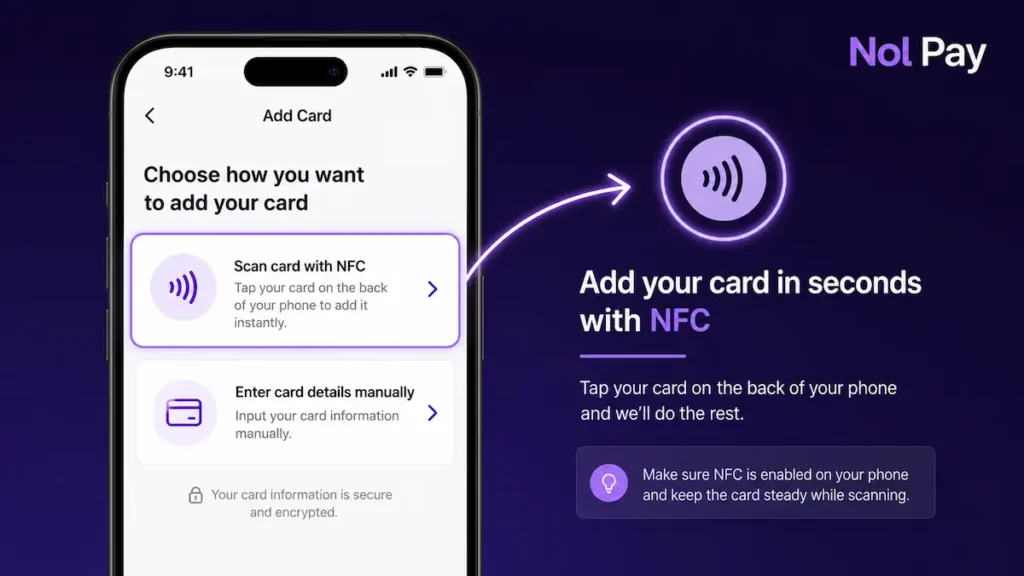
View Your Balance, Transaction History, and More
The dashboard shows your balance prominently. Tap it for a full transaction history: every tap-in, top-up, and transfer. No more guessing at the gate.
Set up auto top-up: pick a threshold (e.g., AED 15) and a recharge amount (AED 50). The app tops up automatically and sends a low-balance reminder before you dip below the AED 7.5 minimum balance rule. RTA introduced proactive SMS and email alerts for this.
Expert Tip: Set up auto top-up in the Nol Pay app to ensure your balance never drops below the AED 7.5 minimum balance rule, avoiding travel disruptions.
Product Recommendation: The Nol Pay app is the most versatile tool, offering real-time balance, transaction history, and instant top-ups.
Link Family Members’ Cards
Add your spouse’s or children’s cards the same way: NFC or Tag ID. You’ll see all balances on one screen and can top up any card instantly. This family linking feature is a standout, and no other balance-check guide covers it.
No smartphone? No problem. The SMS method works on any mobile phone, even a basic one without internet.
Method 3: Check Balance via SMS (No Internet Needed)
No internet? No smartphone? The SMS method has you covered: it’s instant and works on any mobile phone.
The Simple SMS Command
Send BAL [space] [10-digit Tag ID] to 4444. The reply shows your balance and card type within seconds. I expected the basement of Burjuman station to be a dead zone, but the SMS reply hit my phone in under ten seconds. After seven years of daily NOL use, that reliability still surprises me.
Product Recommendation: This service works on any mobile phone, even a basic feature phone without internet. It’s the best fallback in areas with poor data coverage.
Expert Tip: Save your Tag ID as a phone contact named ‘NOL Tag ID’ so you can quickly copy and paste it into the SMS instead of typing the 10-digit number each time.
Limitations of the SMS Method
You must know your Tag ID; the reply won’t show transaction history. Standard SMS charges may apply.
What If the SMS Doesn’t Work?
Check the format: BAL then a space and the full 10-digit Tag ID. If it fails, retry after a few minutes. Fallback: use a station machine or the app.
If you’re already out and about, the fastest check is right at the station. Let’s look at the machines and kiosks.
Method 4: Check Balance at Metro Stations and Smart Kiosks
Sometimes the simplest way is the physical one. Tap your card at any station machine and the balance appears instantly.
Using Ticket Vending Machines (TVMs)
Tap your NOL card on the reader. The screen instantly displays your balance, card type, and expiry.
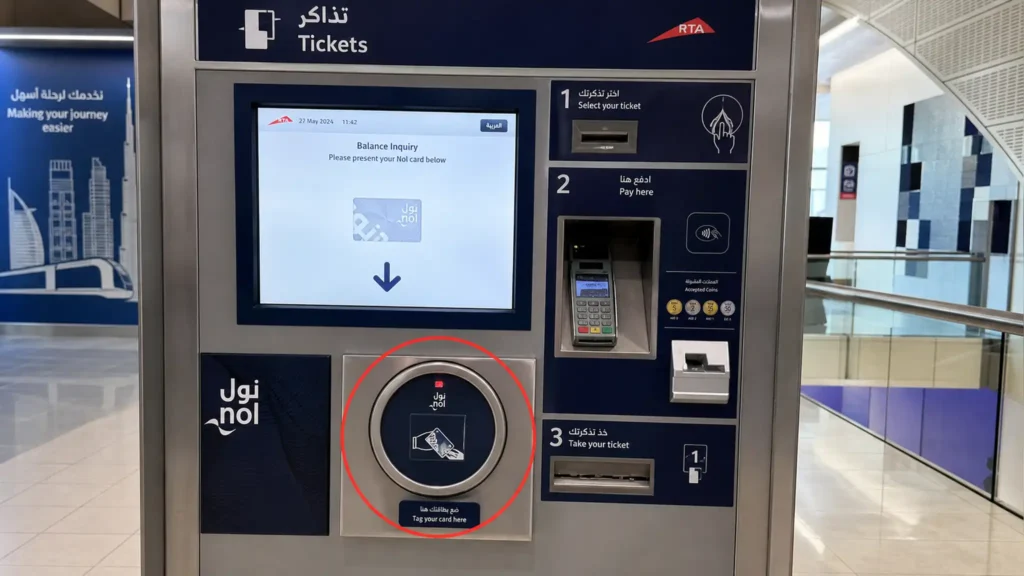
Using Smart Kiosks at Bus Stops and Malls
Tall touch-screen pillars at 32 locations across 21 sites, including the new 24/7 smart bus station at Mall of the Emirates. Tap to see balance and top up. During a quick stop at Mall of the Emirates last Tuesday, I tapped my card on the new smart kiosk and the balance appeared instantly, no queue, no fumbling with an app. That’s the kind of reliability you appreciate when you’re checking your balance 40 times a month.
Product Recommendation: Smart kiosks are available at major bus stops and malls, including The Dubai Mall, Mall of the Emirates, and Ibn Battuta Mall.
What to Do If the Machine Doesn’t Read Your Card
If a machine fails to read your card, try another. Persistent issues may mean the card is damaged.
Expert Tip: If your card is damaged or won’t scan, visit an RTA customer service center immediately to transfer your balance to a new card.
For complex issues or if you prefer human help, RTA’s customer service centers and helpline are your next stop.
Method 5: Check Balance via RTA Customer Service Centers or Call Center
When self-service fails or you need a human touch, RTA’s customer service centers and helpline have your back. Standing at the Union station counter, we handed over a cracked Blue NOL card and watched the agent pull up the full transaction log in seconds. No app or machine can give you that instant, printed history. And it’s the only way to block a lost card and transfer the balance to a new one.
Visit an RTA Customer Service Center
You’ll find staffed RTA counters inside major metro stations: Union, BurJuman, and Mall of the Emirates are the most central. Walk up, hand over your card, and ask for a balance check. The agent can also print a full transaction statement. They can replace a damaged card or handle a lost or stolen one on the spot.
Product Recommendation: If your Blue NOL card is lost or stolen, the service center can block it and transfer the remaining balance to a new card.
Call the RTA Helpline (800 9090)
Dial 800 9090, follow the voice prompts to NOL services, and give the agent your Tag ID. The call is toll-free from any phone, even a hotel phone or a payphone.
Expert Tip: No local SIM? Pick up any hotel phone or find a payphone: 800 9090 is toll-free.
Now that you know all five methods, let’s compare them side by side so you can pick the right one instantly.
Comparison Table: Which Balance Check Method is Right for You?
Five methods, five different situations. Here’s how they stack up.
| Method | Speed | Internet Required? | Device Needed | Best For |
|---|---|---|---|---|
| RTA Website | Instant (with Tag ID ready) | Yes | Any device with a browser | Anyone at a computer with their Tag ID ready |
| Nol Pay App | Instant (NFC tap or manual entry) | Yes (for real-time check) | Smartphone (iOS/Android) with NFC | Daily commuters who want on-the-go checks and full transaction history |
| SMS (send BAL to 4444) | Usually instant, but occasional delays* | No | Any mobile phone (basic or smart) | Tourists, no-data situations, or a quick check without opening an app |
| Metro Station Machines / Smart Kiosks | Instant (tap and read) | No | None (just your NOL card) | Anyone already at a station, especially before tapping in to meet the AED 7.5 minimum |
| RTA Customer Service / Call Center (800 9090) | Wait times vary; call center may have hold, in-person may queue | No (phone signal for call center) | None (just your card) for in-person; phone for call center | Complex issues, lost/stolen cards, or when other methods fail |
*SMS balance checks are typically instant, but during network congestion or peak hours, replies may be delayed by up to a few minutes.
I once watched a friend type his 10-digit Tag ID into the website twice, while I just tapped my card to my phone. That’s when you realize the app isn’t just another method: it’s the only one that skips the Tag ID entirely.
That’s the kind of detail you only learn by using them side by side.
Still unsure? The interactive decision tree below will ask you a few quick questions and point you to your ideal method.
Interactive Decision Tree: Find Your Best Balance Check Method
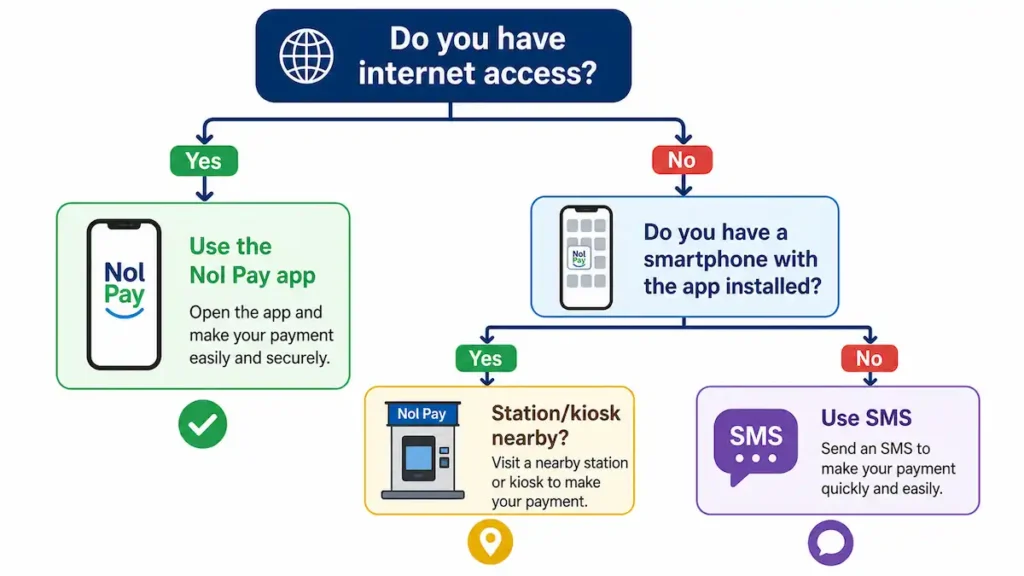
Answer two or three quick questions and this decision tree will tell you exactly which method to use right now.
How the Decision Tree Works
The logic is simple. First, do you have internet access? If yes, the Nol Pay app is your fastest route: open it, tap your card, and the balance appears. No internet? Then ask: do you have a smartphone with the app already installed? The app can show the last synced balance offline, which is often enough.
If you’re without both, the final question is whether you’re at a station or near a kiosk. A ticket machine or RTA counter gives you an instant readout. If not, send an SMS with your Tag ID to the RTA’s balance-check number and you’ll get a reply in seconds.
Which method do the official guides push hardest? The Nol Pay app, every time. And I get it. It’s feature-rich. But my own daily reality says otherwise. Walking through Bur Dubai in July, my data connection often stutters, and the app hangs on a loading spinner.
The SMS method, which the RTA barely mentions, has never failed me. I type the 10-digit Tag ID, hit send, and the balance pings back before I’ve even pocketed the phone. That’s the gap between the brochure and the pavement. That’s why this tree doesn’t just parrot the ideal path: it routes you to what actually works in the moment.
Theory is great, but what about real life? Here’s exactly what to do when things go wrong at the worst possible moment.
Real-Life Scenarios: What to Do When…
Knowing the methods is one thing. Knowing what to do when panic hits is another. Here are three situations every commuter faces.
Scenario 1: “Your Card Fails at the Metro Gate During Rush Hour”
Three seconds. That’s how long it takes for a gate to beep “Insufficient balance” and for the queue behind you to start sighing.
Step aside immediately. Don’t block the gate. Open the Nol Pay app and top up with a minimum of AED 5; the balance updates in seconds. If your phone is dead or you have no data, find the nearest ticket vending machine (TVM) and feed it cash. Every station has at least one. Still stuck? A station attendant can check your balance and point you to the quickest fix.
Expert Tip: Stash a AED 20 note in your wallet for an instant cash top-up at any station ticket machine when your NOL card fails.
Scenario 2: “You’re a Tourist with No Data Plan and a Dying Phone”
Roaming is off, battery is at 5%, and you’re not sure if you have enough credit. Don’t panic. Every metro station and bus stop has a ticket vending machine or smart kiosk: just tap your card on the reader to see the balance instantly. No login, no data needed.
If you can’t find a machine, send a quick SMS with your Tag ID to the RTA balance check service; the reply arrives in seconds and uses almost no battery. Then buy a Silver NOL card at any station for AED 25 (it comes with AED 19 credit) and check the balance at the machine before each trip.
Product Recommendation: For tourists, a Silver NOL card costs AED 25 at any metro station (AED 19 credit included), check the balance at the machine before each trip.
Scenario 3: “You Recharged Online but the Balance Hasn’t Updated”
You topped up via the website or app, but the gate still shows the old balance. This is normal. Online top-ups don’t sync until the card physically touches a reader. Tap your card at any gate or kiosk to force the update.
If the balance still hasn’t changed, confirm the payment went through and wait 10–15 minutes. If it’s still stuck, call RTA customer service; they can push the sync manually.
Expert Tip: After an online recharge, always tap your card at a gate or kiosk to force a balance sync before you travel.
Those scenarios cover the most common emergencies. Now let’s dig into the persistent issues that need a proper fix.
Troubleshooting Common NOL Card Balance Issues
Even the best methods hit snags. Here’s how to fix the four most common NOL balance headaches.
I expected a free balance transfer. My Silver card had stopped scanning, and I assumed the RTA would move my balance at no cost. The agent pointed to a small fee: Silver and Gold cards incur a charge, while Blue card holders get it free. That’s the part nobody warns you about: the card tier you chose months ago determines whether a damaged card costs you anything today.
Issue 1: “Invalid Tag ID” Error on Website or SMS
Cause: wrong number or damaged card. Fix: double-check digits (0 vs O, 1 vs I), use the Nol Pay app’s NFC scan if the card is worn, or visit a service center if it’s physically damaged.
Issue 2: Balance Not Updating After Online Recharge
Cause: sync delay. Fix: tap your card at a gate, bus validator, or kiosk to force the update; check the app or website after 10 minutes; contact RTA if the payment shows successful but the balance is still old.
Issue 3: Card Not Scanning at Gates or Machines
Cause: demagnetized, dirty, or damaged. Fix: wipe with a soft cloth, test at a different machine. If multiple machines reject it, the card is likely damaged. Head to an RTA service center for a balance transfer (Blue card holders usually get it free; Silver and Gold may incur a small fee).
Issue 4: SMS Balance Check Not Working
Cause: incorrect format, network issues, or service downtime. Fix: ensure the exact format ‘BAL [space] [10-digit Tag ID]’ with no extra characters; retry after a few minutes; fall back to a station machine or the app.
Prevention beats cure. This checklist ensures you never face a low-balance surprise again.
NOL Card Balance Checklist for Daily Commuters and Tourists
Print this, screenshot it, or keep it in your wallet, this checklist is your insurance against the dreaded ‘Insufficient balance’ beep.
Pre-Travel Checklist (Do This Before Leaving Home/Hotel)
Check your balance via the Nol Pay app or SMS. Make sure it covers the trip cost plus the AED 7.5 minimum. Top up immediately if it’s low. Tourists: locate the nearest station kiosk now, not later. Keep a photo of your Tag ID on your phone.
At the Station / During Travel
Last Tuesday at BurJuman Station, we watched a commuter freeze at the gate as the ‘Insufficient balance’ tone blared. The AED 7.5 rule stopped him cold. That’s why we always tap the TVM to verify before entering the paid area, and never travel without an emergency AED 20 note tucked in the wallet.
Before you pass through the gate, tap your card at any TVM or kiosk to confirm your balance. If the error tone sounds, step aside and top up immediately. Keep an emergency AED 20 note handy.
After Travel / End of Day
Review your balance to track daily spend and catch any errors. Daily commuters: set up auto top-up tonight. Tourists: if your NOL card is running low, buy a Red Ticket for the next journey instead of recharging.
Expert Tip: Link family members’ NOL cards to your Nol Pay account to monitor and top up everyone’s balance from one place. A lifesaver for parents.
Everything we’ve covered so far is about today’s system. But big changes are coming. Here’s what the 2026 digital upgrade means for you.
Future of NOL: The 2026 Digital Upgrade and What It Means for Balance Checks
The NOL system is getting its biggest upgrade since the metro opened. Here’s what’s changing and what it means for your daily balance check.
The Big Shift: Account-Based Ticketing
RTA has completed 72% of the upgrade. By Q1 2027, your balance and passes will be linked to an online account. The new system supports QR codes, Apple Pay, Samsung Pay, and bank cards.
How Balance Checks Will Change
The card reader beeped red, and I had no cash. That’s when I linked my NOL to the app and never looked back. Check your balance in real time on any device logged into your RTA account. QR code tickets show remaining trips at a glance. Digital wallets let you check and top up from your phone. Lost or damaged cards? No problem: your balance is tied to your account, not the plastic.
What You Should Do Now to Prepare
Download the Nol Pay app and create an account. If you’re still using a Silver card, consider switching to a Blue NOL card for seamless integration. Keep an eye on official RTA announcements for rollout dates.
Before we wrap up, here are the final expert tips and money-saving hacks every commuter should know.
Final Expert Tips and Money-Saving Hacks
You’ve got the methods, the troubleshooting, and the future roadmap. Now, a few final pro tips to keep in your back pocket.
Expert Tip: Steer clear of third-party balance-check websites that ask for personal details. Only use official RTA channels or the Nol Pay app. The sketchiest balance-check site I’ve seen looked more legit than the RTA’s own portal. I contacted RTA’s customer service line and they confirmed: no third-party site is authorized to request your Emirates ID or card PIN. That call saved a colleague from handing over his details to a clone site the next week. Stick to the Nol Pay app, ticket machines, or rta.ae.
Expert Tip: If you travel often, grab a Gold NOL card. It gives you access to less crowded cabins and works with all the same balance-check methods.
Expert Tip: Tourists: buy a Silver NOL card at any metro station for AED 25 (AED 19 credit included) and check your balance at a ticket machine before each trip.
Expert Tip: If your card is damaged or not scanning, visit an RTA customer service center immediately to transfer your balance to a new card.
Expert Tip: Stash an emergency AED 20 note in your wallet. If your card runs out unexpectedly, you can top up at a station machine in seconds.